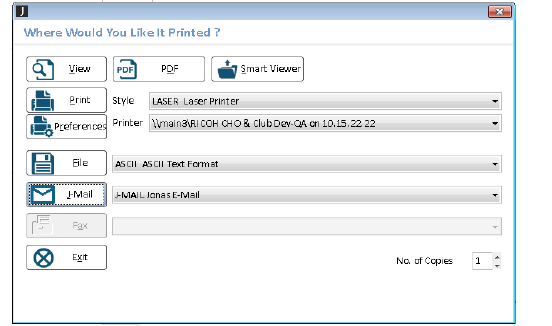
Any time you want to view, print to a printer or to PDF, send e-mail, or create a file for export you will see the printer dialog screen: “Where Would You Like It Printed?” (System Administration > Common Programs > Where Would You Like It Printed?).
Depending on what output you are trying to generate, your options on this dialog may be restricted - for example, if the report is too wide, none of your Printer Styles may be defined wide enough to accommodate physically printing it out, so none will be offered (and you’ll have to send it to PDF or Smart Viewer or File).
Tip: if you experience delays in having this printer dialog screen appear, have a look at your Windows printers - printers that are defined, but offline, or no longer exist, will cause delays because Jonas is trying to present a list of valid printers for you to choose from. Removing old printers from Windows will increase performance.
To use the dialog, decide what output you wish to create and select the appropriate button. For a discussion of what each button does, see the System Administration > Common Programs > Where Would You Like It Printed? topic.